
Microsoft warns Windows 11 features are failing due to its expired certificate
An expired digital certificate has broken several built-in apps and features for some users of Windows 11. Microsoft published a notice about the issue after numerous complaints on its Community Forums stating that attempting to open the Snipping Tool presented a “This app can’t open” error. The error’s description also stated that a problem with Windows was
Microsoft warns Windows 11 features are failing due to its expired certificate
An expired digital certificate has broken several built-in apps and features for some users of Windows 11.
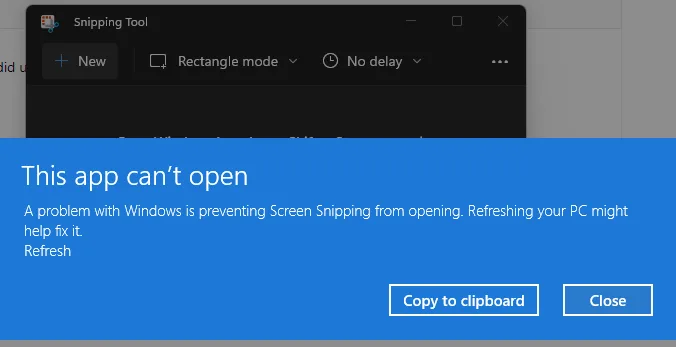
Microsoft published a notice about the issue after numerous complaints on its Community Forums stating that attempting to open the Snipping Tool presented a “This app can’t open” error.
The error’s description also stated that a problem with Windows was preventing Screen Snipping from opening and suggested refreshing the PC might help fix it.
While that did not seem to help, one user figured out that manually changing the date on their PC to 31 October 2021 and then back to the current date fixed the issue.
Microsoft has now explained that the problem was a Microsoft digital certificate that had expired 31 October 2021.
The company said the expired certificate might also affect other apps and features, including:
- Accounts page and landing page in the Settings app in Windows 11 S Mode
- Start menu in Windows S Mode
- Touch Keyboard, Voice Typing, and Emoji Panel
- Input Method Editor user interface (IME UI)
- Getting started and Tips
Microsoft has rolled out a patch, dubbed KB4006746, that fixes the issue for the touch keyboard, voice typing, emoji panel, IME UI, and the “Getting started and Tips” section.
The update is still in preview, so it must be installed manually via Windows Update.
The Snipping Tool and issues with Windows 11 S Mode remain unfixed.
Microsoft said it was working on a “near-term resolution” for these and would provide an update when available.
In the interim, it recommended using the Print Screen key to capture screenshots and copy them into documents. Affected users can also paste the screenshot into Paint and select the section they want to copy.
Main Image: CNET